The idea is to have a scaffold I can clone whenever I start a new project, with auth, email, CRUD, and admin already wired up. The less Javascript I write, the happier I am.

Here is what I built: a simple bookstore CRUD demo.
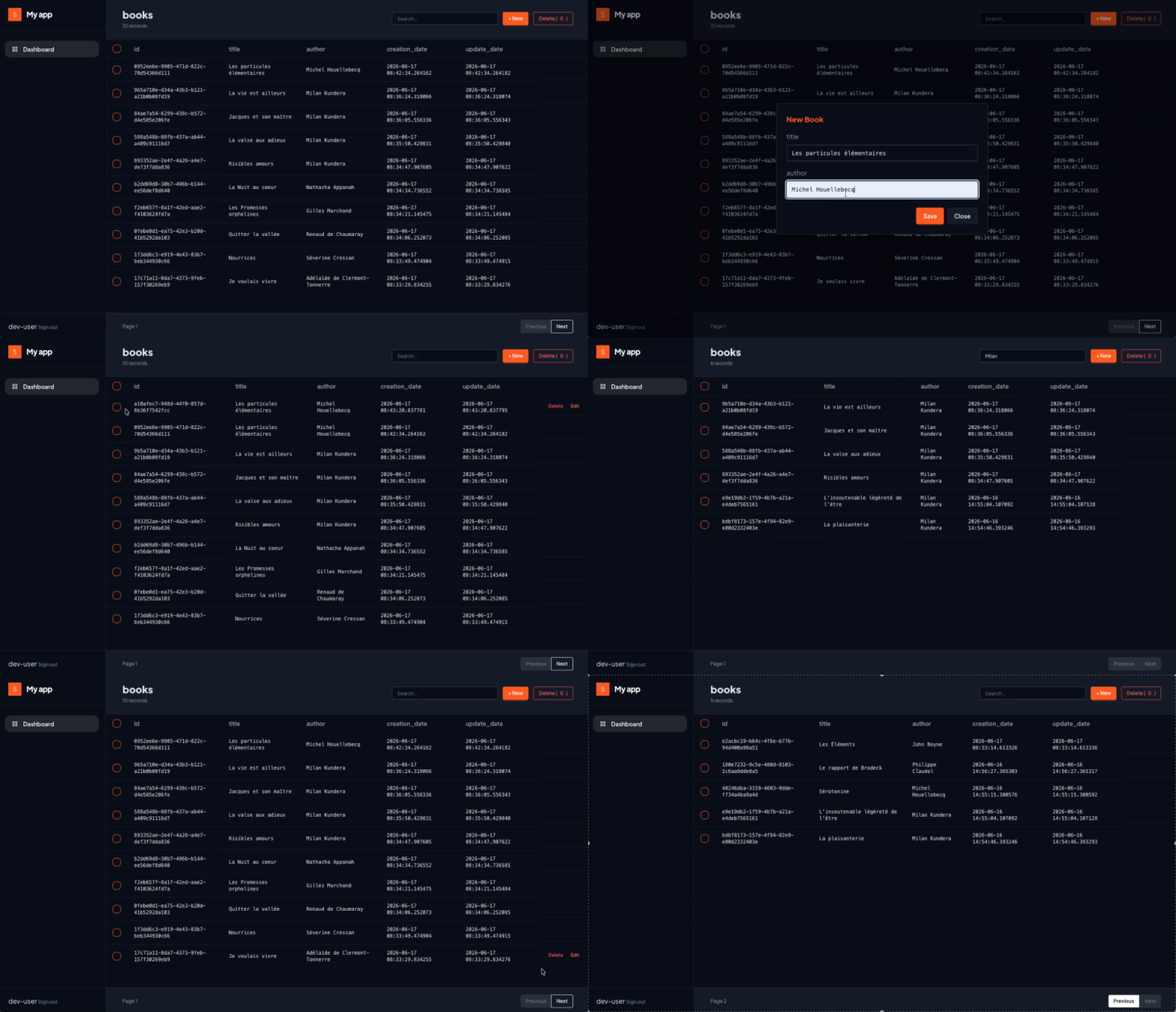
Here is my stack:
Stack
| Tool | Role |
|---|---|
| FastAPI | Backend |
| SQLModel | ORM — one class is model, schema, and table |
| pydantic-settings | Config from .env files |
| Jinja2 | Server-side HTML rendering |
| HTMX | Dynamic UI without JavaScript |
| DaisyUI | Components and theming |
| Alpine.js | Client-side state only |
Project structure
My brain has other things to think about rather than deciding which app structure to choose. This one fits me, because every “object” of the app has its own routes, services, etc.
MyApp/
├── app/
│   ├── auth/              # Signup, login, verification, password reset
│   │   ├── models.py      # User model
│   │   ├── schemas.py     # Pydantic validation (UserCreate, UserPublic, TokenData)
│   │   ├── service.py     # Business logic
│   │   └── router.py      # Routes
│   ├── crud/             # Example CRUD module
│   │   ├── models.py      # Book model (linked to User via foreign key)
│   │   ├── schemas.py     # BookPublic (controls what fields get exposed)
│   │   ├── service.py     # CRUD with ownership checks
│   │   └── router.py      # Routes with pagination & search
│   ├── core/              # Shared infrastructure
│   │   ├── settings.py    # Pydantic-settings (.env loading)
│   │   ├── db.py          # Engine & session
│   │   ├── security.py    # Password hashing (Argon2), JWT
│   │   └── dependencies.py # Auth guards (get_current_user, get_admin_user)
│   ├── mail/              # Email delivery
│   │   ├── service.py     # SMTP logic
│   │   └── templates.py   # HTML email templates
│   ├── admin/             # Admin panel (database introspection)
│   │   ├── router.py
│   │   ├── service.py
│   │   └── schemas.py
│   ├── templates/         # All Jinja2 templates (pages/, components/)
│   ├── static/            # CSS, JS
│   └── main.py            # App entrypoint, middleware, exception handlers
├── pyproject.toml
├── .env.dev               # Local dev config (gitignored)
└── Dockerfile
Every module has four files: service, models, router, and schemas:
- router calls service with schemas inputs
- service calls the database via models
routers are thin: they call a service, and get an output. services are heavy: computation happens here (business logic, pagination, etc).
Setup
uv init
uv add "fastapi[standard]" sqlmodel pydantic-settings "pwdlib[argon2]" pyjwt slowapi jinja2
Settings
Remember: never commit .env in our repo. Use pydantic-settings to read our env variables.
- In dev, use a .env.dev file
- In prod, use a secret manager, or pass your variables at build time
pydantic-settings reads from .env.dev locally and from environment variables in production. Env vars always override the file. No code changes needed between environments.
# app/core/settings.py
from pydantic_settings import BaseSettings, SettingsConfigDict
from pydantic import model_validator

class Settings(BaseSettings):
    model_config = SettingsConfigDict(env_file='.env.dev', env_file_encoding='utf-8', extra='ignore')

    # Core
    APP_NAME: str = "MyApp"
    ENVIRONMENT: str = "development"
    DATABASE_URL: str = "sqlite:///./dev.db"
    # Generate with: python -c "import secrets; print(secrets.token_urlsafe(32))"
    SECRET_KEY: str
    ALGORITHM: str = "HS256"
    BASE_URL: str = "http://127.0.0.1:8000"

    @model_validator(mode="after")
    def validate_secret_key_in_production(self):
        if self.ENVIRONMENT == "production" and len(self.SECRET_KEY) < 32:
            raise ValueError("SECRET_KEY must be at least 32 characters in production")
        return self

settings = Settings()
Key points:
- Every field has a default except SECRET_KEY — if it’s missing, the app crashes at startup. This is intentional.
- The model_validator ensures we can’t deploy to production with a weak key.
- extra='ignore' means extra env vars (like PORT from Cloud Run) won’t cause errors.
And remember: never, ever commit your secrets to github. And if you do, delete the repo and the git history. Secrets stay in the git history.
Database
When I am really lazy, i just use JSON files to mock a DB. I did this a couple of times, and it was actually a bad idea because in the end I need a DB.
ORM or no ORM ? I was against, and I changed my mind for simple apps. Trading simplicity vs flexibility.
What I gain ? 3 lines of code to add a new row to my db, easy mutation of objects - basically not having to write SQL. What I lose ? Control over SQL. And for some apps that require joins, or complex data manipulations (window functions, nested queries, CTEs, etc), ORM is not an option.
# app/core/db.py
from app.core.settings import settings
from sqlmodel import create_engine, SQLModel, Session

connect_args = {}
if settings.DATABASE_URL.startswith("sqlite"):
    connect_args["check_same_thread"] = False
else:
    connect_args["sslmode"] = "require"
engine = create_engine(settings.DATABASE_URL, connect_args=connect_args, pool_recycle=300)

def create_db_and_tables():
    SQLModel.metadata.create_all(engine)


def get_session():
    with Session(engine) as session:
        yield session
get_session is a generator dependency — FastAPI opens a session, injects it into our route, and closes it when the request finishes. pool_recycle=300 prevents stale connections on managed databases (Neon, Cloud SQL).
A note on database migrations: I prefer to run SQL queries myself whenever a migration is needed. I really don’t see the point of using Alembic. Need to add a new column ? Alter table. That’s pretty much the only migration I need to do. But of course, more complex projects might require Alembic.
A simple Book model
Enough tutorials with “TODO lists”, let’s be much more creative and use books here to use for our CRUD. Plus i like reading. If you like horses, replacing books with horses also works.
from sqlmodel import SQLModel, Field
from typing import Optional
from uuid import uuid4
from datetime import datetime, timezone


class Book(SQLModel, table=True):
    id: Optional[str] = Field(default_factory=lambda: str(uuid4()), primary_key=True)
    title: str = Field(max_length=50, index=True, nullable=False)
    author: str = Field(max_length=50, index=True, nullable=False)
    user_id: str = Field()
    creation_date: datetime = Field(default_factory=lambda: datetime.now(timezone.utc), nullable=False)
    update_date: datetime = Field(default_factory=lambda: datetime.now(timezone.utc), nullable=False)
user_id is a foreign key to User. Every book belongs to a user — this is how we scope data. More on that in the post about authentication.
Public schema (controlling exposed fields)
To be honest, it took me some time to use Pydantic models. It seemed unnecessarily verbose, and i did not see the real advantage of it. But it comes handy when you start mixing different types, and need data validation.
# app/books/schemas.py

from pydantic import BaseModel
from datetime import datetime

class BookPublic(BaseModel):
    id: str
    title: str
    author: str
    creation_date: datetime
    update_date: datetime
This controls what fields appear in the table UI. user_id is never exposed to the frontend:
The Service
CRUD is actually boring, in a way, but i’d say most of websites are actually CRUD: - Facebook is about creating/updating/deleting/reading posts - Stackoverflow is about creating/updating/deleting/reading posts
Ok, actually not every app is about posting something. But from the moment you manipulate objects, you need CRUD.
# app/books/service.py

from sqlmodel import Session, select, SQLModel, or_
from app.crud.models import Book
from datetime import datetime, timezone


def get_book(book_id, session: Session):
    row = session.get(Book, book_id)
    return row


def create_book(title: str, author: str, user_id: str, session: Session):
    book = Book(title=title, author=author, user_id=user_id)
    session.add(book)
    session.commit()
    session.refresh(book)
    return book


def list_books(session: Session, user_id: str, query: str="", limit: int=10, offset: int=0):
    """
    Args:
        session: Session, used to communicate with db
        query: str, used to filter results
        limit: int, number of records to be returned
        offset: int, allows to iterate over batches of data (pagination)
    Returns:
        books: list, data records
    """
    statement = select(Book).where(Book.user_id == user_id)
    if query:
        statement = statement.where(
            or_(
                Book.title.contains(query),
                Book.author.contains(query),
            )
        )

    statement = statement.offset(offset).limit(limit+1).order_by(Book.update_date.desc())
    try:
        results = session.exec(statement).all()
        return {"results": results[:limit], "has_next": len(results) == limit+1}
    except:
        return []


def update_book(book_id: str, title: str, author: str, user_id: str, session: Session):
    book = get_book(book_id=book_id, session=session)

    # Mandatory to avoid unauthorized access !!!
    if not book or book.user_id != user_id:
        return None

    book.title = title
    book.author = author
    book.update_date = datetime.now(timezone.utc)
    session.add(book)
    session.commit()
    session.refresh(book)
    return book


def delete_book(book_id: str, user_id: str, session: Session):
    book = get_book(book_id=book_id, session=session)

    # Mandatory to avoid unauthorized access !!!
    if not book or book.user_id != user_id:
        return None

    session.delete(book)
    session.commit()
    return book
Notes:
- Every mutating operation verifies the user owns the record. Forgetting this check is a famous security vulnerability called IDOR: Insecure Direct Object Reference. Happens more often that we think and can have dramatic effect (French government passport issuing website leaked data through that) :
python
    def update_book(book_id: str, title: str, author: str, user_id: str, session: Session):
        book = get_book(book_id=book_id, session=session)
        if not book or book.user_id != user_id:
            return None
        book.title = title
        book.author = author
        book.update_date = datetime.now(timezone.utc)
        session.add(book)
        session.commit()
        session.refresh(book)
        return book
- Pagination : limit + 1 on list queries: fetch one more than needed. If the DB returns limit + 1 rows, there’s a next page. Slice to limit before returning.
The router (endpoints)
Usually a 1:1 mapping between services and endpoints. Each endpoint should call a service once. This is also where auth is managed.
# app/books/router.py

import os
from typing import Optional

from fastapi import APIRouter, Depends, Request, Response, Form, HTTPException
from fastapi.responses import HTMLResponse
from fastapi.templating import Jinja2Templates
from sqlmodel import Session

from app.crud import service as BookService
from app.crud.schemas import BookPublic
from app.core.db import get_session

router = APIRouter(prefix="/app")
templates_dir = os.path.join(os.path.dirname(os.path.dirname(__file__)), "templates")
templates = Jinja2Templates(templates_dir)
USER_ID = "dev-user"  # hardcoded for now — auth comes in part 2

@router.get("/", response_class=HTMLResponse)
async def get_dashboard(request: Request, user: str=USER_ID):
    return templates.TemplateResponse(
        request=request,
        name="pages/dashboard.html",
        context={
            "user": user,
            "tables": {}
        }
    )


@router.get("/books", response_class=HTMLResponse)
def list_books(
    request: Request,
    user_id: str=USER_ID,
    q: Optional[str]="",
    limit:int=10,
    page: int=1,
    session: Session=Depends(get_session)):

    results = BookService.list_books(
        session=session,
        user_id=user_id,
        query=q,
        limit=limit,
        offset=(page-1)*limit
    )

    data = {
        'columns': BookPublic.model_fields.keys(),
        'rows': results['results']
    }

    return templates.TemplateResponse(
        request=request,
        name="components/table.html",
        context={
            'name': 'books',
            'table': data,
            'query': q,
            'page': page,
            'limit': limit,
            'has_next': results['has_next']
        }
    )


@router.get("/books/{book_id}", response_class=HTMLResponse)
def get_book(
    request: Request,
    book_id: str,
    session: Session=Depends(get_session)):
    data = BookService.get_book(book_id, session)
    data = {
        'columns': BookPublic.model_fields.keys(),
        'rows': data
    }

    return templates.TemplateResponse(
        request=request,
        name="components/table.html",
        context={'name': 'books', 'table': data}
    )


@router.post("/books")
def create_book(
    response: Response,
    title: str=Form(...),
    author: str=Form(...),
    session: Session=Depends(get_session)):

    BookService.create_book(title, author, USER_ID, session)
    response.headers["HX-Refresh"] = "true"
    return Response(status_code=200, headers={"HX-Refresh": "true"})


@router.post("/books/update")
def update_book(
    response: Response,
    title: str=Form(...),
    author: str=Form(...),
    id: str=Form(...),
    session: Session=Depends(get_session)):

    book = BookService.update_book(id, title, author, USER_ID, session)
    if not book:
        raise HTTPException(403, "Forbidden")
    response.headers["HX-Refresh"] = "true"
    return Response(status_code=200, headers={"HX-Refresh": "true"})


@router.delete("/books/{book_id}/delete")
def delete_single_book(
    response: Response,
    book_id: str,
    session: Session=Depends(get_session)):

    book = BookService.delete_book(book_id, USER_ID, session)
    if not book:
        raise HTTPException(403, "Forbidden")
    response.headers["HX-Refresh"] = "true"
    return Response(status_code=200, headers={"HX-Refresh": "true"})


@router.post("/books/delete")
def bulk_delete_books(
    response: Response,
    selected_ids: list[str] = Form(...),
    user_id: str=USER_ID,
    session: Session=Depends(get_session)):

    for book_id in selected_ids:
        BookService.delete_book(book_id, user_id, session)
    response.headers["HX-Refresh"] = "true"
    return Response(status_code=200, headers={"HX-Refresh": "true"})
-> We don’t do a redirect in the CRUD routes. Sending a response with a HX-Refresh header is enough here. No need to use RedirectResponse from FastAPI.
Wiring this up
# app/main.py

import os
from contextlib import asynccontextmanager

from fastapi import FastAPI, Request
from fastapi.responses import RedirectResponse
from fastapi.staticfiles import StaticFiles

from app.crud.router import router as book_router
from app.core.db import create_db_and_tables, get_session
from app.core.settings import settings


@asynccontextmanager
async def lifespan(app: FastAPI):
    create_db_and_tables()
    yield

app = FastAPI(lifespan=lifespan)


# Static & Templates
static_dir = os.path.join(os.path.dirname(__file__), "static")
app.mount("/static", StaticFiles(directory=static_dir), name="static")

# Routers
app.include_router(book_router)

@app.get("/health")
async def health_check():
    return {"status": "ok"}

@app.get("/")
async def index(request: Request):
    return RedirectResponse(url="/auth/login", status_code=302)
-> The lifespan part is important since the DB will be initialized here.
Frontend: HTMX + DaisyUI + Alpine.js
| Tool | Role |
|---|---|
| HTMX | Server requests (hx-get, hx-post, swap HTML fragments) |
| DaisyUI | UI components (buttons, modals, tables, themes) |
| Alpine.js | Client-side state only (toggles, dropdowns, checkbox counting) |
-> The server returns HTML, not JSON
I said at the beginning we (I) didn’t want to hear about Javascript. HTMX and AlpineJS are actually very lightweight JS libs.
Forgive me Father for I have sinned.
What is HTMX?
| Attribute | What it does | Example |
|---|---|---|
hx-get |
Makes a GET request | hx-get="/app/books" |
hx-post |
Makes a POST request | hx-post="/app/books" |
hx-target |
Where to put the response HTML | hx-target="#content" |
hx-swap |
How to insert it (default: innerHTML) |
hx-swap="outerHTML" |
hx-trigger |
What triggers the request (default: natural event) | hx-trigger="keyup changed delay:200ms" |
hx-indicator |
Element to show during loading | hx-indicator="#spinner" |
A traditional SPA flow:
1. User clicks a button
2. JavaScript sends fetch("/api/books")
3. Server returns JSON [{"id": 1, "title": "..."}]
4. JavaScript loops through JSON, builds <tr> elements, inserts into DOM
With HTMX:
1. User clicks a button with hx-get="/app/books"
2. Server renders HTML with Jinja2, returns a <table> fragment
3. HTMX drops it into the target element
(Almost) No JavaScript, no JSON parsing, no DOM manipulation.
Base template
God I hate HTML. Fortunately vibe coding can help on writing boring HTML. We need a world where HTML and CSS finally become one single entity. When this day comes, we will all rejoice. Right now, the shell that every page extends:
<!-- app/templates/pages/base.html -->
<html data-theme="my-theme">
<head>
  <meta charset="UTF-8">
  <meta name="viewport" content="width=device-width, initial-scale=1.0">

  <!-- DaisyUI (must load before Tailwind) -->
  <link href="https://cdn.jsdelivr.net/npm/daisyui@5" rel="stylesheet" type="text/css" />
  <script src="https://cdn.jsdelivr.net/npm/@tailwindcss/browser@4"></script>

  <!-- HTMX -->
  <script src="https://cdn.jsdelivr.net/npm/htmx.org@2.0.8/dist/htmx.min.js"></script>

  <!-- Alpine.js (defer = runs after DOM is ready) -->
  <script defer src="https://cdn.jsdelivr.net/npm/alpinejs@3.14.1/dist/cdn.min.js"></script>

  <!-- Custom theme -->
  <style>
    [data-theme="carpenter"] {
      --color-base-100: #0B0F19;
      --color-base-200: #161B26;
      --color-base-300: #1E293B;
      --color-base-content: #E2E8F0;
      --color-primary: #FF5A1F;
      --color-primary-content: #fff;
      --color-neutral: #94A3B8;
      --color-error: #EF4444;
      --color-success: #22C55E;
      font-family: 'Plus Jakarta Sans', sans-serif;
    }
  </style>
</head>
<body>
  {% block content %}{% endblock %}
</body>
</html>
Loading order matters:
- DaisyUI CSS first, then Tailwind JS — otherwise Tailwind overrides DaisyUI’s component styles.
- Alpine.js with defer — ensures the DOM is ready before Alpine initializes.
When to use what
A simple rule:
- Need data from the server? → HTMX (hx-get, hx-post)
- Need to toggle something on screen? → Alpine.js (x-show, x-data)
- Need a styled component? → DaisyUI class (btn, modal, table)
Never use Alpine.js for server requests, and never use HTMX for client-side toggles.
- Use
{% extends %}jinja tags to inherit from base, and{% block %}to include content. - For reusable components, define them once and reuse using
{% include %} - Define a
base.htmlfor everything related to CSS and scripts. Use a placeholder for the main content
{% extends "pages/base.html" %}

{% block content %}
<!-- Sidebar -->
<div class="text-slate-200 font-sans antialiased h-screen flex overflow-hidden" x-data>
{% include "components/aside.html" %}
  <div class="overflow-x-auto transition-all" id="content" hx-get="/app/books" hx-swap='outerHTML' hx-trigger="load">
    <div class="flex-1 overflow-y-auto p-10">
      <h1 class="text-3xl font-[900] text-white tracking-tight mb-8">Dashboard</h1>
      <div class="grid grid-cols-3 gap-4">


      </div>
    </div>

  </div>
</div>

{% endblock %}
A data table
CRUD = data table. Most of the time. Users, books, horses. We need tables.
But he who builds a datatable shall also build search and pagination. This is the price to show off and have your girlfriend/boyfriend think you’re the next Zuckerberg.
<div class="flex-1 flex flex-col overflow-hidden" id="content" x-data="{ selectedIds: [] }">
  <div class="px-10 py-6 border-b border-base-300 bg-base-200 flex items-center justify-between shrink-0">
    <div>
      <h1 class="text-2xl font-extrabold">{{ name }}</h1>
      <div class="text-xs text-neutral mt-1">{{ table.rows | length }} records</div>
    </div>
    <div class="flex items-center gap-3">
      <!-- Search bar -->
      <input
        type="text"
        placeholder="Search..."
        name="q"
        value="{{ query }}"
        hx-get="/app/{{ name }}"
        hx-push-url="true"
        hx-trigger="keyup changed delay:500ms"
        hx-target="#content"
        class="input input-bordered input-sm w-64">
      <!-- Add button -->
      <button class="btn btn-primary btn-sm"
            hx-get="/app/modal/new"
            hx-target="#modal"
            hx-swap="innerHTML"
            @click="modal.showModal()">+ New</button>

      <!-- Delete button -->
      <button class="btn btn-error btn-outline btn-sm"
              id="bulkDelete">
        Delete (<span x-text="selectedIds.length"></span>)
      </button>
    </div>
  </div>

  <dialog id="modal" class="modal"></dialog>

  <div id="spinner" class="htmx-indicator fixed inset-0 z-50 flex items-center justify-center bg-black/50">
    <span class="loading loading-spinner loading-lg text-primary"></span>
  </div>

  <!-- Table -->
  {% if table %}
  <div class="flex-1 overflow-auto">
    <form id="checked-rows"
      hx-post="/app/{{ name }}/delete"
      hx-target="#content" hx-swap="outerHTML"
      hx-indicator="#spinner"
      hx-trigger="click from:#bulkDelete">
      <table class="table">
        <thead>
          <tr>
            <th class="w-10">
              <input type="checkbox" class="checkbox checkbox-sm checkbox-primary">
            </th>
            {% for col in table.columns %}
            <th>{{ col }}</th>
            {% endfor %}
            <th class="w-20"></th>
          </tr>
        </thead>
        <tbody>
          {% for row in table.rows %}
          <tr class="hover group">
            <td>
              <input type="checkbox" value="{{ row.id }}" class="checkbox checkbox-sm checkbox-primary" name="selected_ids" x-model="selectedIds">
            </td>
            {% for col in table.columns %}
            <td class="font-mono text-xs">{{ row[col] }}</td>
            {% endfor %}
            <td class="flex">
              <button
                class="btn btn-ghost btn-xs text-error opacity-0 group-hover:opacity-100"
                hx-get="/app/modal/{{ row.id }}/delete"
                hx-target="#modal"
                hx-swap="innerHTML"
                @click="modal.showModal()">Delete</button>
              <button
                class="btn btn-ghost btn-xs text-primary opacity-0 group-hover:opacity-100"
                hx-get="/app/modal/{{ row.id }}/edit"
                hx-target="#modal"
                hx-swap="innerHTML"
                @click="modal.showModal()">Edit</button>
            </td>
          </tr>
          {% endfor %}
        </tbody>
      </table>
    </form>
  </div>

  <!-- Pagination -->
  <div class="px-10 py-4 border-t border-base-300 bg-base-200 flex items-center justify-between shrink-0">
    <div class="text-xs text-neutral">
      Page {{ page }}
    </div>
    <div class="join">
      <button
        class="join-item btn btn-sm btn-outline hover:bg-white hover:text-black"
        hx-get="/app/books?q={{ query }}&page={{ page - 1 }}&limit={{ limit }}"
        hx-push-url="true"
        hx-target="#content"
        {% if page <= 1 %}disabled{% endif %}
        >Previous</button>
      <button
        class="join-item btn btn-sm btn-outline hover:bg-white hover:text-black"
        hx-get="/app/books?q={{ query }}&page={{ page + 1 }}&limit={{ limit }}"
        hx-push-url="true"
        hx-target="#content"
        {% if not has_next %}disabled{% endif %}
        >Next</button>
    </div>
  </div>
  {% else %}
  <div class="flex-1 overflow-auto h-full">
    <div class="flex items-center justify-center h-screen">Nothing to show</div>
  </div>
  {% endif %}
</div>
Notes: - Top section: search, add new, delete - Middle section: the table - Bottom section: pagination
Modals
We can add modals in two ways: - with Alpine (Client-side) - with HTMX (server-side)
I choose server-side here, mostly because in the HTMX philosophy, the server owns the state. Trying to play around with AlpineJS and x-data attributes increased the code a lot, for something that’s simply not worth it. Let the server render the modal, overlay it, and that’s done. I really keep the JS part to the minimum to toggle stuff, show/hide, or display dynamic elements.
Trying to mix client-side state and server-side state is the best way to shoot yourself in the foot.
Add a new book
<!-- app/templates/components/new_book_modal.html -->
<div class="modal-box border border-neutral/20 shadow-lg">
  <h3 class="text-lg font-bold text-primary">{{ title }}</h3>

  <form hx-post="/app/books/" hx-target="#content" hx-swap="outerHTML transition:true" hx-indicator="#spinner">
    {% for col in columns %}
    <div class="form-control space-y-2 mt-4 {% if col == 'id' %}hidden{% endif %}">
      <label class="label">{{ col }}</label>
      <input type="text" name="{{ col }}" value="{{ row[col] }}" class="input input-bordered w-full font-mono">
    </div>
    {% endfor %}
    <div class="modal-action">
      <div id="spinner" class="htmx-indicator">Work in progress...</div>
      <button type="submit" class="btn btn-primary">Save</button>
      <button type="button" class="btn" onclick="modal.close()">Close</button>
    </div>
  </form>

</div>
<form method="dialog" class="modal-backdrop"><button>close</button></form>
Add a new route to the router. This will be triggered when we click the “New” button.
@router.get("/modal/new", response_class=HTMLResponse)
async def new_book_form(request: Request):
    return templates.TemplateResponse(
        request=request,
        name="components/new_book_modal.html",
        context={"title": "New Book", "action": "/app/books", "method": "hx-post", "row": {}, "columns":
["title", "author"]}
    )
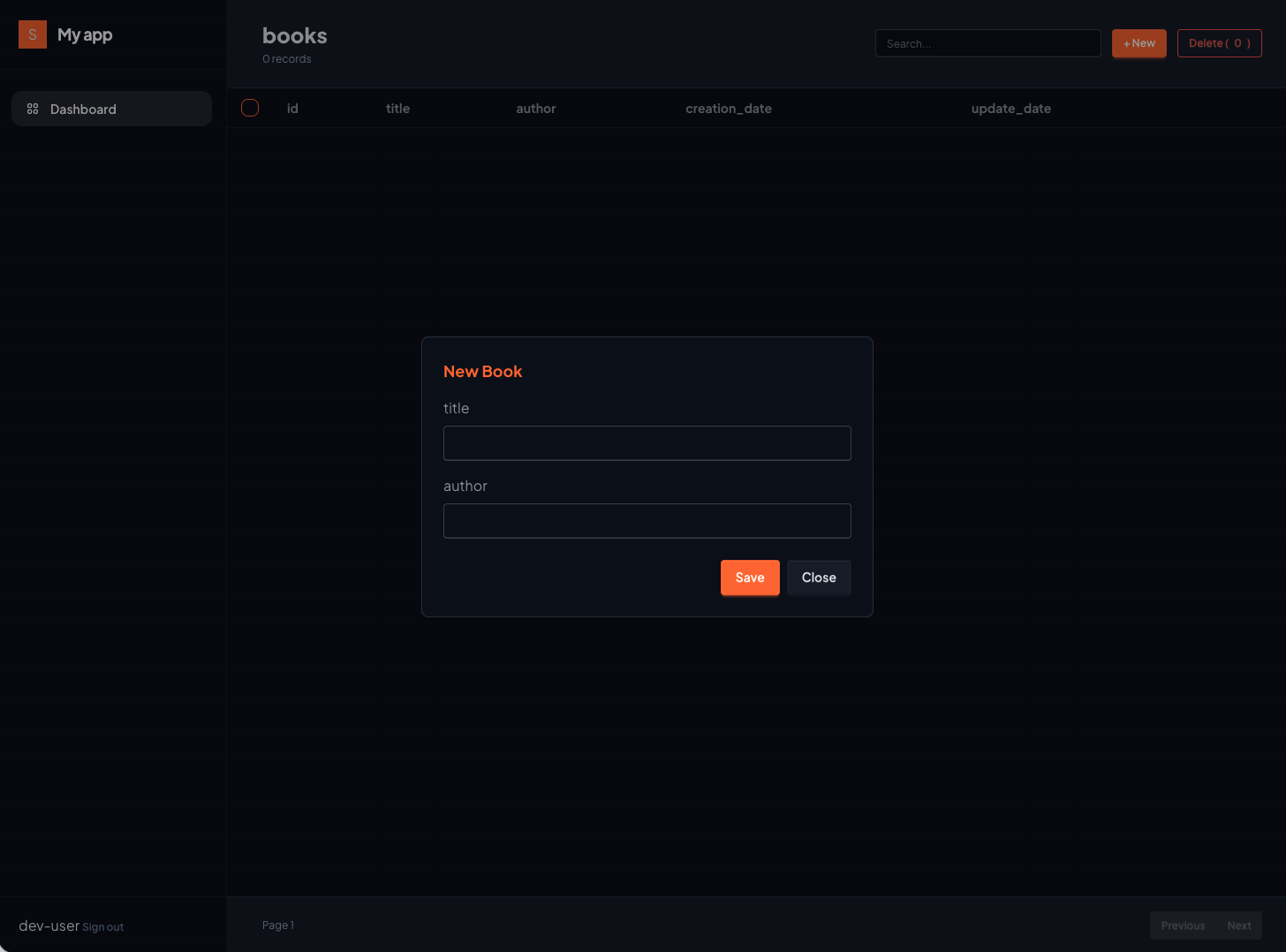

Edit a book
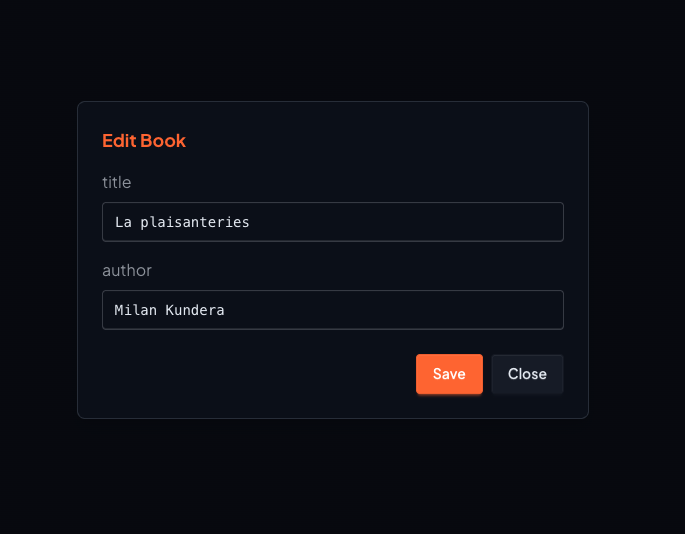
Being lazy, I reuse the previous modal and just change the hx-post attribute to /app/books/update.
And add the route to the router:
@router.get("/modal/{book_id}/edit", response_class=HTMLResponse)
def edit_book_form(request: Request, book_id: str, session: Session = Depends(get_session)):
    book = BookService.get_book(book_id, session)
    return templates.TemplateResponse(
        request=request,
        name="components/edit_book_modal.html",
        context={"title": "Edit Book", "action": "/app/books/update", "method": "hx-post", "row":
book, "columns": ["id", "title", "author"]}
    )
Modal appears prefilled, just need to edit and save:
Delete a book
Same. Need a delete modal, and the associated route. Just change the form method to hx-delete and change the endpoint:
@router.get("/modal/{book_id}/delete", response_class=HTMLResponse)
async def delete_book_form(request: Request, book_id: str, session: Session = Depends(get_session)):
    return templates.TemplateResponse(
        request=request,
        name="components/delete_book_modal.html",
        context={"title": "Delete Book", "action": f"/app/books/{book_id}/delete", "method": "hx-delete", "columns": ["id", "title", "author"]}
    )
Bulk delete
This is where Alpine comes handy. Each row in our table has a <input type="checkbox" value="{{ row.id }}" class="checkbox checkbox-sm checkbox-primary" name="selected_ids" x-model="selectedIds"></td>
It’s referring to the x-data="{ selectedIds: [] }" defined at the beginning of table.html. Each selected checkbox will be pushed to the array. It means that we can count the number of rows selected. Since all checkboxes share the same name, they will be grouped when sent to the server:
<form id="checked-rows"
    hx-post="/app/books/delete"
    hx-target="#content" hx-swap="outerHTML"
    hx-indicator="#spinner"
    hx-trigger="click from:#bulkDelete">
    <table>
      ...
    </table>
</form>
Server-side:
@router.post("/books/delete")
def bulk_delete_books(
    response: Response,
    selected_ids: list[str] = Form(...),  # <-- comes from the form
    user_id: str=USER_ID,
    session: Session=Depends(get_session)):

    for book_id in selected_ids:
        BookService.delete_book(book_id, user_id, session)
    response.headers["HX-Refresh"] = "true"
    return Response(status_code=200, headers={"HX-Refresh": "true"})
To be honest, this one is more of a show-off. Or actually, it was AlpineJS begging me to have a little role in my post. So there you go Alpine.
Search
When your app starts getting millions of users (happens less frequently than expected, at least did not happen to me yet), you need something to find people by name. So here is the search feature in preparation for the day i cross the million users.
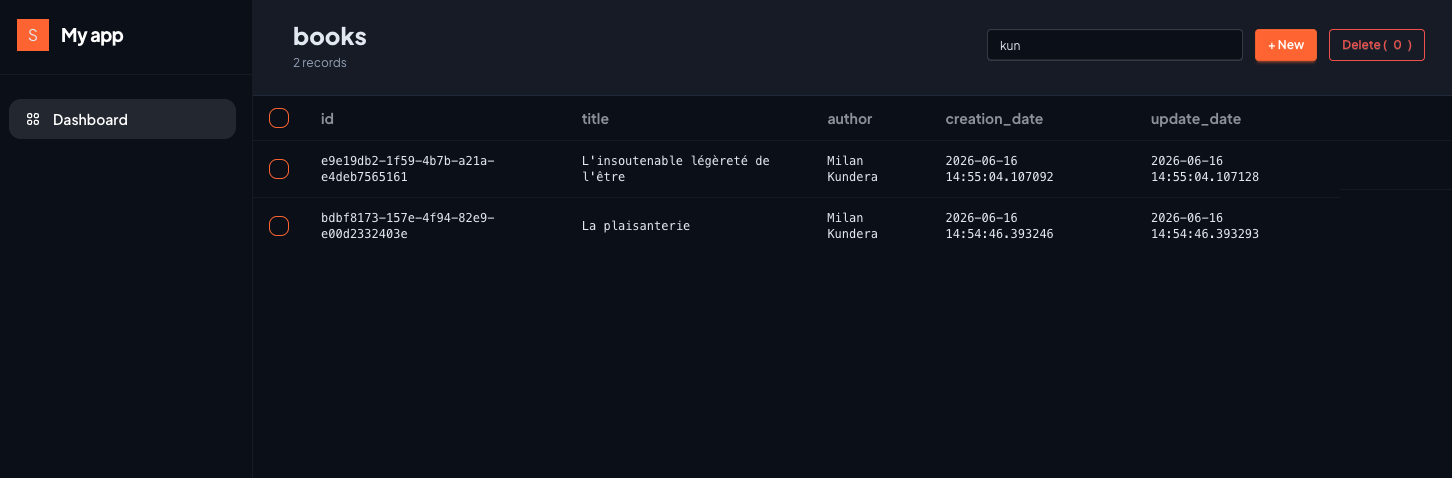
Route and service are already ready to receive a search/filter:
@router.get("/books", response_class=HTMLResponse)
def list_books(
    request: Request,
    user_id: str=USER_ID,
    q: Optional[str]="", # <-- HERE
    limit:int=10,
    page: int=1,
    session: Session=Depends(get_session)):
And the service:
def list_books(session: Session, user_id: str, query: str="", limit: int=10, offset: int=0):
    """
    ...
    if query:
        statement = statement.where(
            or_(
                Book.title.contains(query),
                Book.author.contains(query),
            )
        )
    ...
Client-side, easy. The little search field will trigger a request with the q parameter:
<input
  type="text"
  placeholder="Search..."
  name="q"
  value="{{ query }}"
  hx-get="/app/books"
  hx-push-url="true"
  hx-trigger="keyup changed delay:500ms"
  hx-target="#content"
  class="input input-bordered input-sm w-64">
Notes
- value="{{ query }}": the query value is returned by the server alongside with the filtered results, so we keep track of current filter applied
- hx-push-url="true": updates the URL so the search is bookmarkable
- hx-trigger="keyup changed delay:500ms": debounce, avoids a request on every keystroke
Pagination
Already wired as well. Took me some time to wrap my head around limit, offset, etc. Buttons activation/deactivation can be boring also.
@router.get("/books", response_class=HTMLResponse)
def list_books(
    request: Request,
    user_id: str=USER_ID,
    q: Optional[str]="",
    limit:int=10,# <-- HERE
    page: int=1,# <-- HERE
    session: Session=Depends(get_session)):
And in the table.html:
<!-- Pagination -->
  <div class="px-10 py-4 border-t border-base-300 bg-base-200 flex items-center justify-between shrink-0">
    <div class="text-xs text-neutral">
      Page {{ page }}
    </div>
    <div class="join">
      <button
        class="join-item btn btn-sm btn-outline hover:bg-white hover:text-black"
        hx-get="/app/books?q={{ query }}&page={{ page - 1 }}&limit={{ limit }}"
        hx-push-url="true"
        hx-target="#content"
        {% if page <= 1 %}disabled{% endif %}
        >Previous</button>
      <button
        class="join-item btn btn-sm btn-outline hover:bg-white hover:text-black"
        hx-get="/app/books?q={{ query }}&page={{ page + 1 }}&limit={{ limit }}"
        hx-push-url="true"
        hx-target="#content"
        {% if not has_next %}disabled{% endif %}
        >Next</button>
    </div>
  </div>
What’s next
Part 2: authentication — JWT cookies, login, token refresh middleware, and replacing USER_ID = "dev-user" with a real user.